Data Flow
This page covers the three main runtime flows: search, booking creation, and cancellation/rescheduling. Each flow is illustrated with the relevant diagram and a step-by-step description.
Search Flow
A patient query traverses two hops: the Search Service for filtering practitioners, then the Availability Service to resolve exact open slots for a selected practitioner.
Patient → ALB → Search Service → OpenSearch (geo + specialty + availability filter)
  → Returns ranked practitioner list with next_available_slot

Patient selects practitioner → ALB → Availability Service → Redis bitmap
  → Returns exact available time slots for the chosen date range
OpenSearch query structure: A single compound query combines:
- geo_distance filter on practitioner location
- term filter on specialty
- range filter on next_available_slot
- Relevance scoring by distance and rating
Redis bitmap lookup: Each practitioner/day pair maps to a 24-bit integer (one bit per hour slot). The Availability Service decodes this into a list of open times in O(1).
Booking Flow
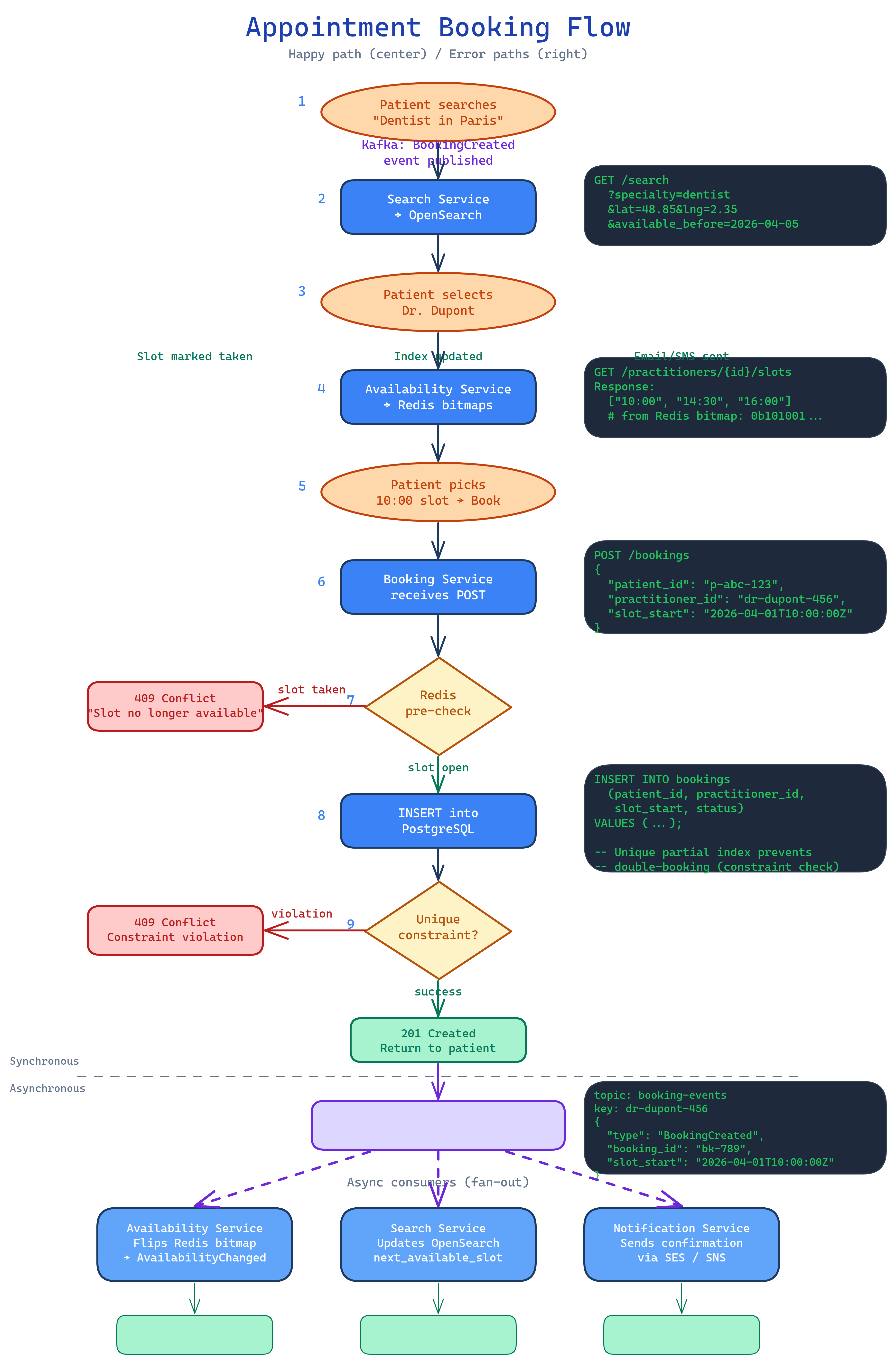
The booking flow is designed for strong consistency on the write path while keeping read-path latency low via Redis pre-checks.
Step-by-step:
- Patient → ALB → Booking Service — patient submits a booking request for a specific practitioner/slot.
- Redis pre-check — Booking Service queries the availability bitmap to confirm the slot is likely free. This short-circuits obvious conflicts before hitting the database, reducing lock contention under load.
- INSERT into RDS — the unique partial index (
idx_no_double_book) is the definitive conflict gate. If two concurrent requests pass the Redis check, only one INSERT succeeds. - Publish
BookingCreated→ MSK — the event is produced to thebooking-eventstopic, partitioned bypractitioner_idto guarantee per-practitioner ordering. - Availability Service consumes
BookingCreated→ marks the Redis bitmap slot as booked → publishesAvailabilityChangedtoavailability-events. - Search Service consumes
AvailabilityChanged→ updates thenext_available_slotfield in the practitioner's OpenSearch document. - Notification Service consumes
BookingCreated→ sends confirmation email (SES) and SMS/push (SNS) to both patient and practitioner.
Redis pre-check is an optimisation, not a lock
The pre-check reduces database round-trips under contention but does not prevent double-booking on its own. The database constraint is the authoritative gate. See ADR-004.
Cancellation and Rescheduling Flow
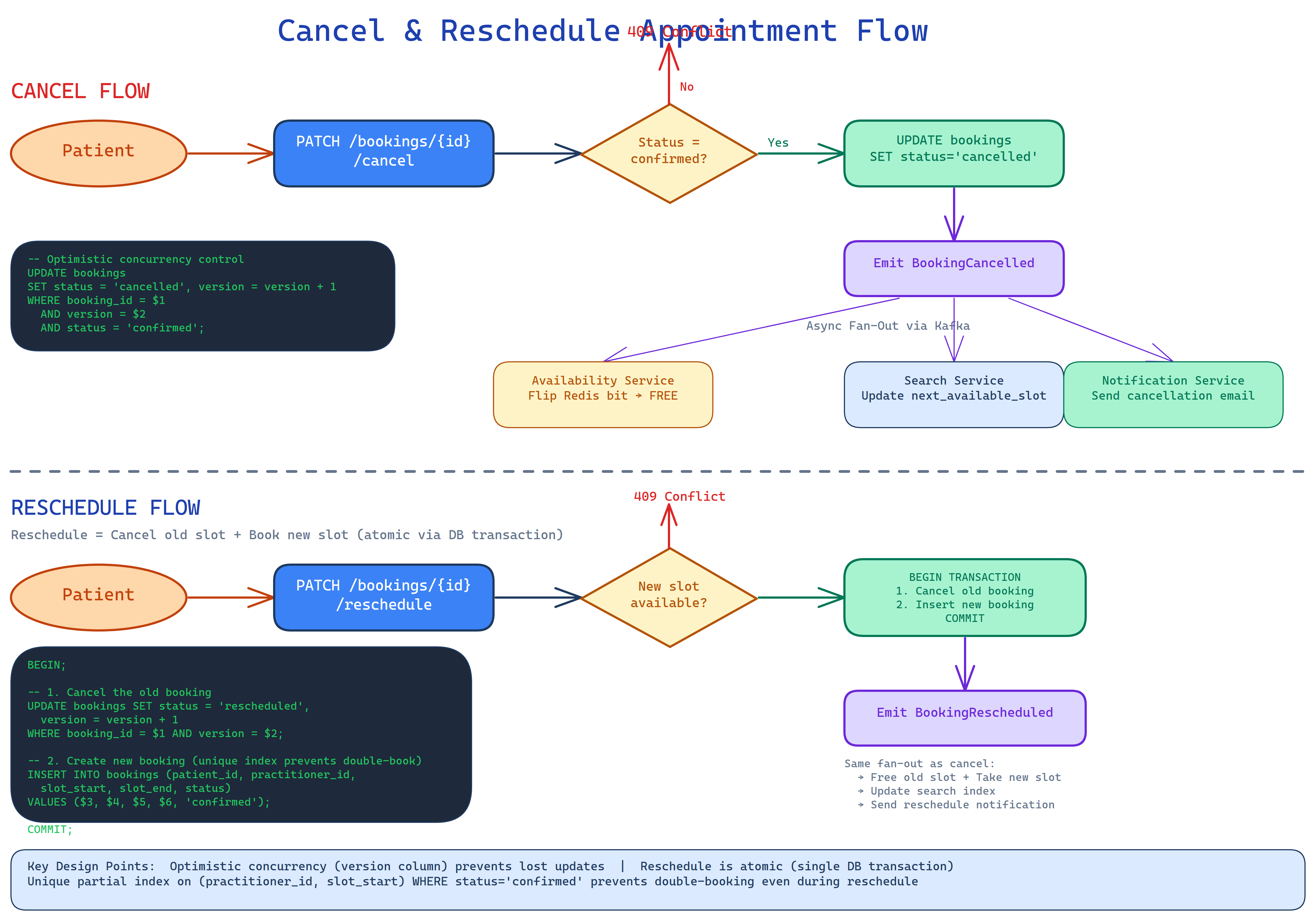
Cancellations use optimistic concurrency via a version column on the bookings table. The UPDATE includes a WHERE version = $current_version clause; if another write raced ahead, the update affects zero rows and the client retries.
Cancellation step-by-step:
- Patient → ALB → Booking Service — patient submits a cancellation for booking ID N.
- UPDATE bookings SET status = 'cancelled', version = version + 1 WHERE id = N AND version = $v — optimistic lock. Zero rows updated = conflict, client retries.
- Publish
BookingCancelled→ MSK (booking-events, partitioned bypractitioner_id). - Availability Service consumes
BookingCancelled→ clears the Redis bitmap slot → publishesAvailabilityChanged. - Search Service consumes
AvailabilityChanged→ updatesnext_available_slotin OpenSearch (slot is now free). - Notification Service consumes
BookingCancelled→ sends cancellation confirmation to patient and practitioner.
Rescheduling is implemented as a cancellation of the old booking followed by a new booking creation. Both operations are wrapped in a single RDS transaction to prevent a gap where the slot appears free between the cancel and re-book.
Event Flow / Kafka Topology
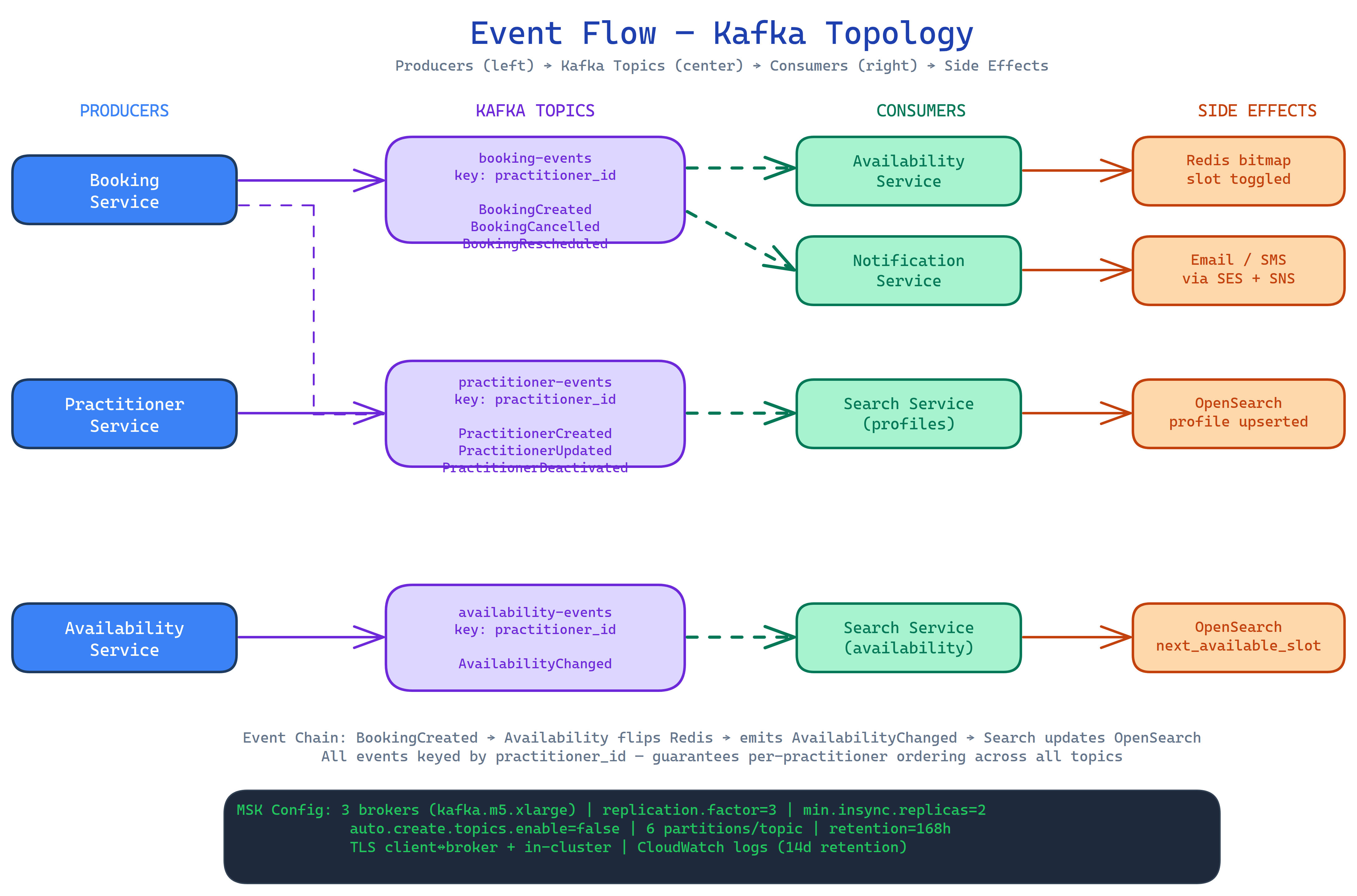
The diagram above shows the full Kafka topology: which services produce to which topics, and which services consume from each topic.
Topics:
| Topic | Producers | Consumers |
|---|---|---|
booking-events |
Booking Service | Availability Service, Notification Service |
availability-events |
Availability Service | Search Service |
practitioner-events |
Practitioner Service | Search Service, Availability Service |
Key configuration:
- Partitioned by
practitioner_idfor per-practitioner ordering guarantees - Replication factor 3; min in-sync replicas 2 — survives single broker loss
- 7-day / 168-hour retention — enables full replay to rebuild read models (OpenSearch indices, Redis bitmaps)
- 6 partitions per topic by default
Read model recovery via Kafka replay
If the OpenSearch cluster or Redis is lost, both can be fully rebuilt by replaying the 7-day Kafka log. This eliminates the need for a separate backup/restore procedure for these derived stores.