Multi-Country Expansion
The platform is designed so that launching a new country requires no code changes — only configuration, an OpenSearch index, a database partition, and practitioner onboarding.
Multi-Country Architecture Diagram
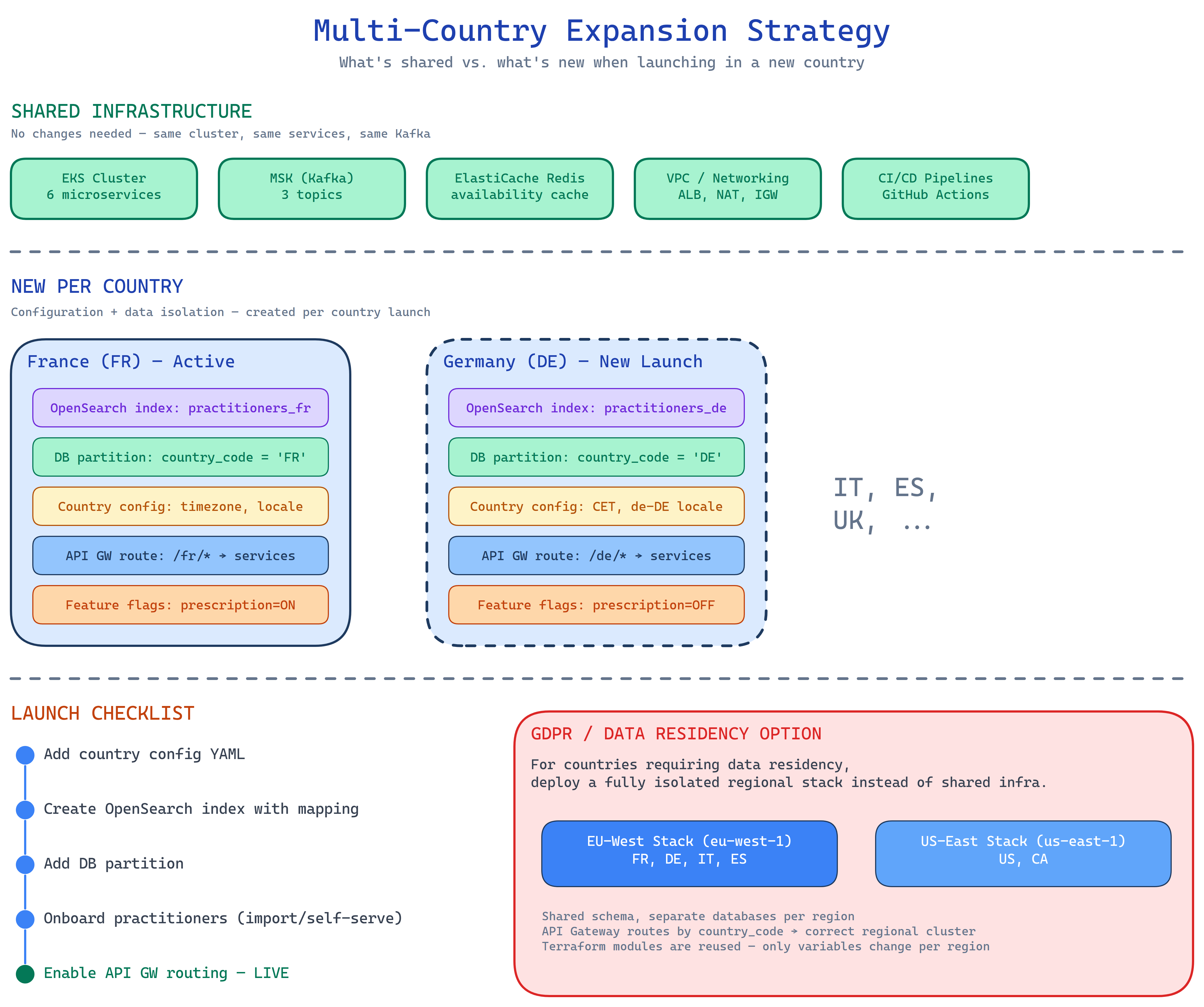
The diagram shows which resources are shared across countries and which are isolated per country, along with the GDPR regional deployment strategy.
Shared vs. Per-Country Resources
| Resource | Shared | Per-Country |
|---|---|---|
| EKS cluster | All services | — |
| RDS clusters | Cluster infra | country_code partition |
| ElastiCache | All caches | Keyspace prefix by country |
| MSK (Kafka) | All topics | Topic partitioned by practitioner_id (includes country) |
| OpenSearch | Cluster infra | One index per country (practitioners_{cc}) |
| API Gateway | Base config | Path prefix per country (/{cc}/v1/…) |
New Country Launch Checklist
Launching a new country involves five steps, all achievable without a service deployment:
Add the country to the platform config: timezone, locale, regulatory fields, and feature flags.
Create the per-country index with country-specific field mappings:
Add a partition to the practitioners and bookings tables for the new country_code:
Bulk import practitioner profiles via the Practitioner Service API, or enable self-service registration. The import triggers practitioner-events Kafka events which the Search Service consumes to populate the new OpenSearch index.
GDPR and Data Residency
For markets requiring strict data residency (e.g., Germany, France under national GDPR implementations), the platform supports isolated regional stacks.
When to use a regional stack
A regional stack is only needed when data must not leave a specific AWS region. For countries that can share the eu-west-1 region, the shared-cluster approach with country_code partitioning is sufficient.
A regional stack reuses the same seven Terraform modules with region-specific variables:
# terraform/environments/production-de/main.tf
provider "aws" {
  region = "eu-central-1"   # Frankfurt
}

module "networking" {
  source   = "../../modules/networking"
  project  = "appointment-system-de"
  vpc_cidr = "10.1.0.0/16"
}
# ... same modules, different region + CIDR
What is isolated per regional stack:
- VPC and all subnets
- RDS clusters (patient data never leaves the region)
- ElastiCache cluster
- MSK cluster
- OpenSearch domain
What remains shared (non-personal data, no residency requirement):
- ECR image repositories
- GitHub Actions runners
- Terraform state bucket (can be cross-region replicated for DR)